Crestron Mercury®
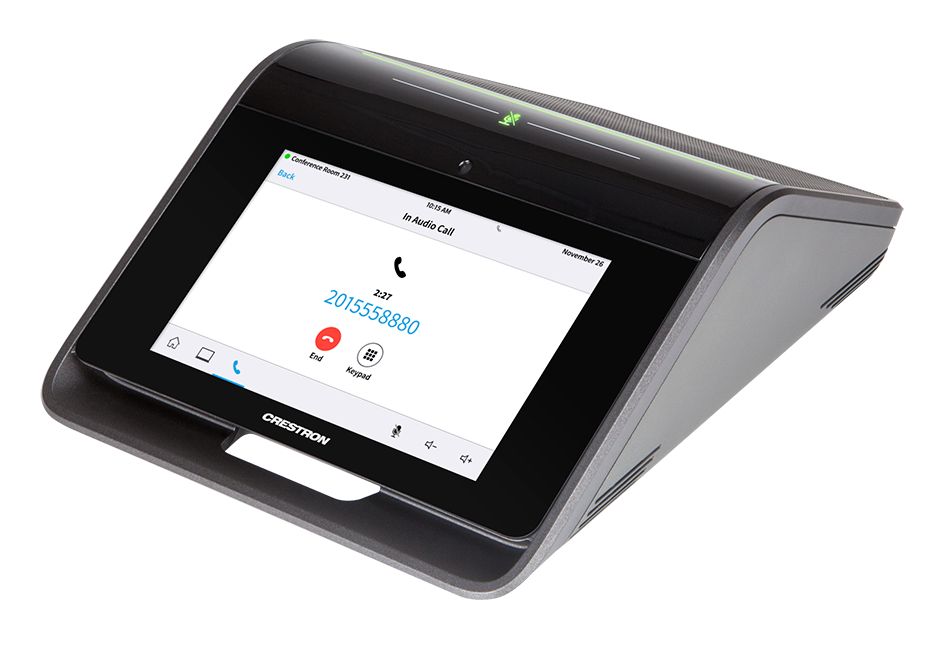
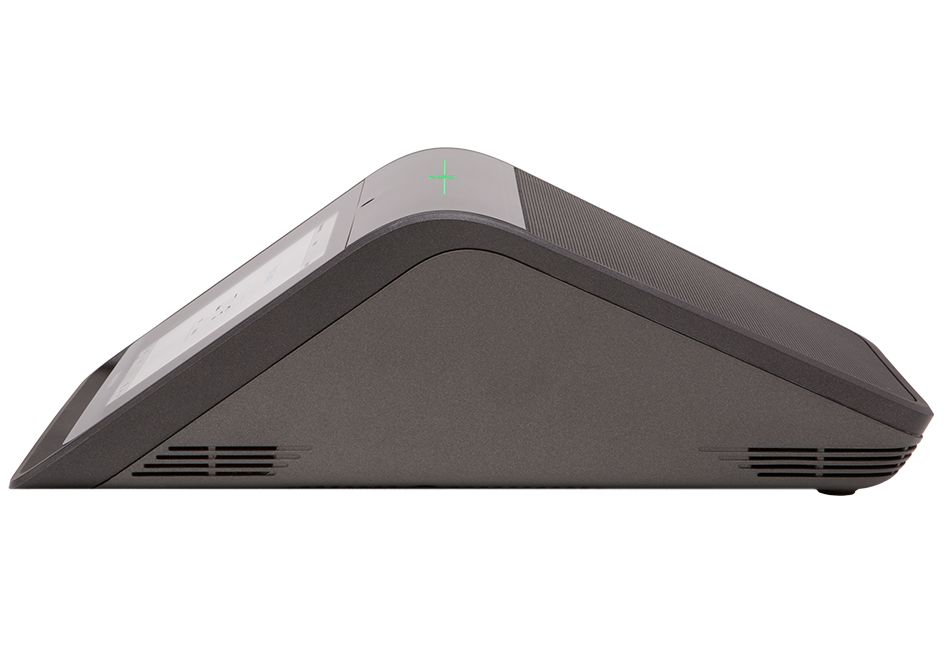
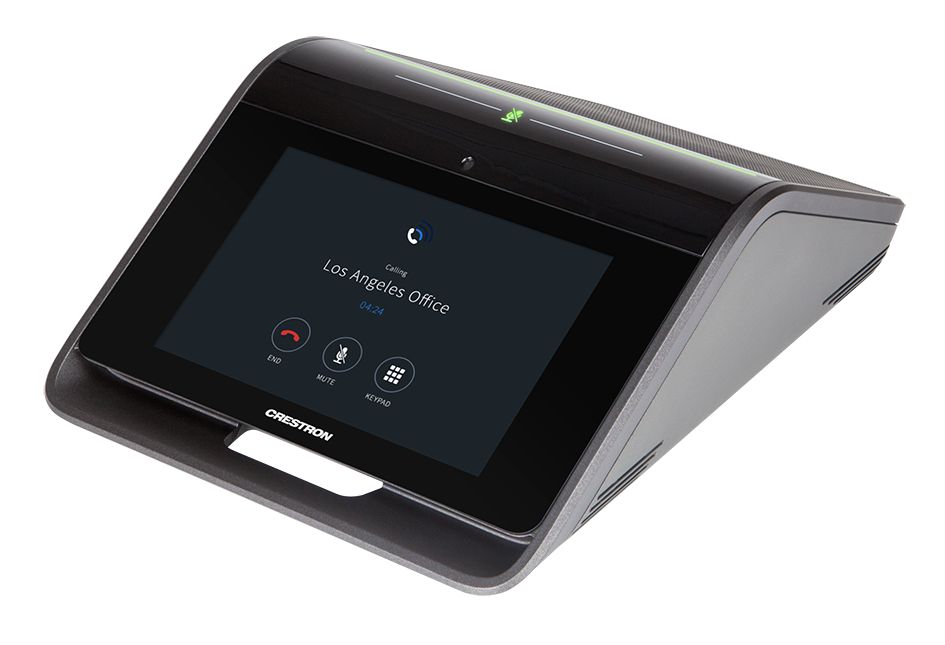
Crestron Mercury is a remarkable tabletop console device engineered to provide a superior conferencing and collaboration experience for enterprise and SMB applications. It is available in multiple forms, including models for “Open UC” audio or video conferencing applications, as well as models dedicated for use with the Microsoft Teams® IC platform as part of a complete Crestron Flex UC solution. In any huddle space, meeting room, or executive office, Crestron Mercury delivers a distinctively simple and consistent user experience in all the places people work and meet.
Built on the IoT cloud based XiO Cloud™ platform, Crestron Mercury empowers IT administrators and AV integrators to deploy, manage, monitor, and evolve thousands of networked UC devices — simply, quickly, and securely — all from a single dashboard. By standardizing on Crestron Mercury, any organization can realize a more productive and stress-free workplace through greater acceptance and utilization of UC technology that’s truly easy to use.
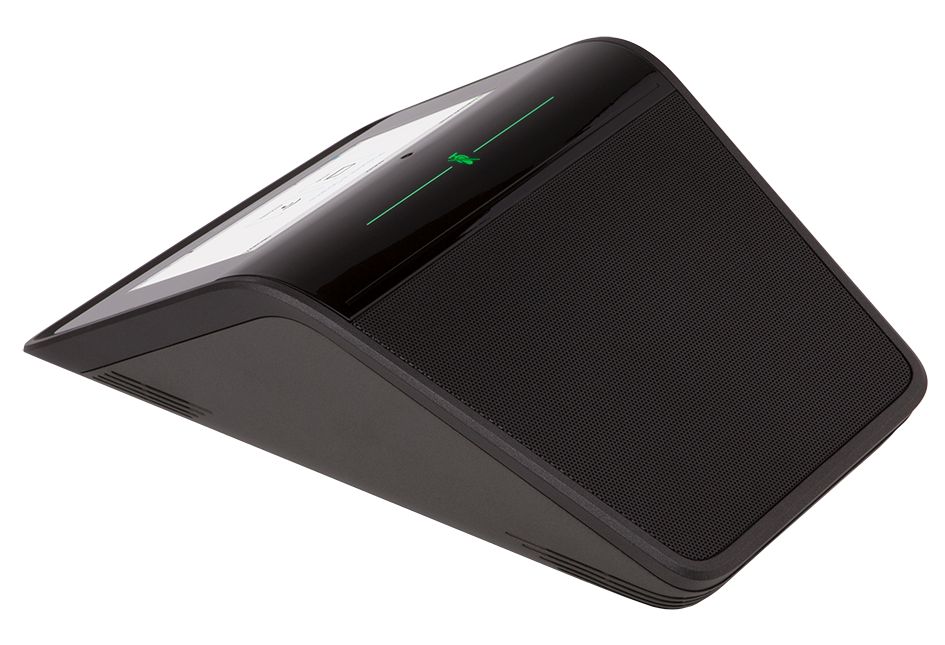
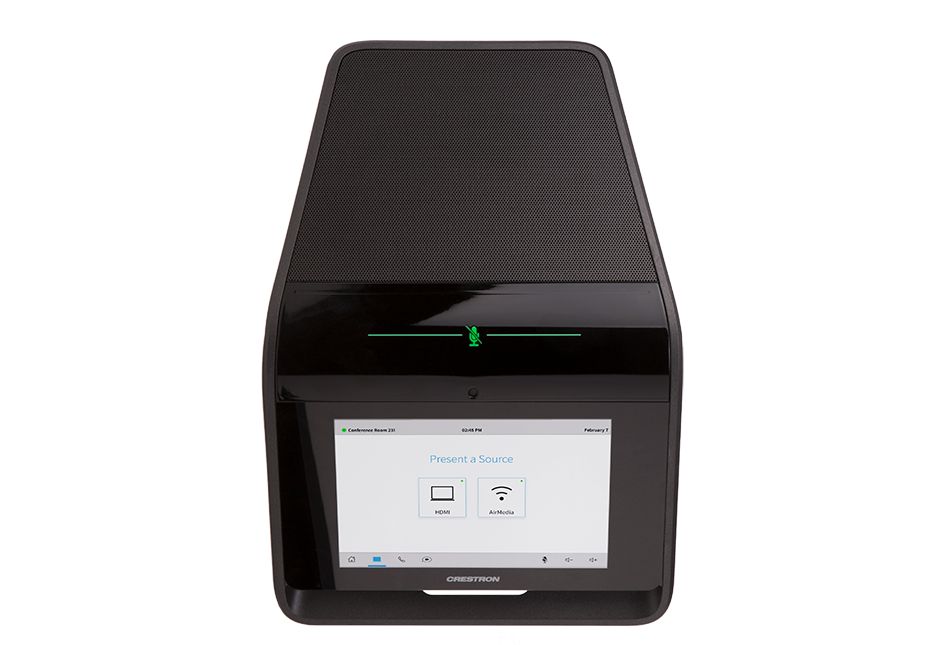
In one stunning tabletop device, the Crestron Mercury UC conference console (CCS-UC-1 Series) comprises a high-performance, full-duplex conferencing speakerphone and touch screen controller with extensive connectivity for BYOD devices and networked solutions. It is offered in four different models, each featuring identical hardware loaded with specific firmware and licensing to accommodate different applications as follows:
- CCS-UC-1 – Provides an audio conferencing solution for open-platform UC applications. Works natively with any SIP VoIP phone system, Skype® for Business VoIP application, or Zoom Rooms™ conferencing system. It also works with any audio conferencing or softphone application running on a laptop connected via USB, and pairs with any mobile phone via Bluetooth®. Features onboard room scheduling capabilities and LDAP corporate directory access.
- CCS-UC-1-AV – Features all the capabilities of the CCS-UC-1 and adds video conferencing, collaboration, and content sharing capabilities using any UC platform. Works with any web conferencing application running on a laptop connected via USB, and supports wired or wireless AV presentation from any BYOD source via HDMI® and AirMedia®. Connects to a single room display to provide a customizable front-of-room user experience.
- CCS-UC-1-T – Provides an audio conferencing solution specifically engineered for use with the Microsoft Teams intelligent communications platform.
- CCS-UC-1-T-V – Provides a video conferencing solution for use with Microsoft Teams or Skype for Business as part of a complete Crestron Flex UC video conference system.
Note: Any of the above models can be converted to another through a simple firmware update and/or additional licensing.
All four models are sold exclusively as part of a selection of complete UC system kits as follows:
- CCS-UC-1 W/PS – Crestron Mercury Tabletop UC Audio Conference System – Provides a complete kit designed for open-platform audio conferencing applications. Includes the CCS-UC-1 console, cables, and power supply.
- CCS-UC-1-AV W/PS – Crestron Mercury Tabletop UC Video Conference System w/Basic Camera – Provides a complete kit designed for open-platform video conferencing and collaboration applications. Supports a single display device and HD video presentation from wired and wireless BYOD content sources. Includes the CCS-UC-1-AV console, Logitech® Webcam C930e camera, cables, and power supply.
- CCS-UC-1-AV-PLUS – Crestron Mercury Tabletop UC Video Conference System w/Professional Camera – Provides all the capabilities of the CCS-UC-1AV W/PS kit with a higher quality camera. Includes the CCS-UC-1-AV console, Huddly™ GO camera, cables, and power supply.
- UC-M100-T – Crestron Flex M100-T Tabletop UC Audio Conference System for Microsoft Teams – Provides a complete system kit for Microsoft Teams audio conferencing applications. Includes the CCS-UC-1-T console, LAN cable, power supply, and 1-year XiO Cloud Premium subscription.
- UC-M150-T – Crestron Flex M150-T Tabletop UC Video Conference System for Microsoft Teams – Provides a complete system kit for Microsoft Teams or Skype for Business video conferencing and collaboration applications. Supports dual displays and HDMI presentation content input. Includes the CCS-UC-1-T-V console, UC Engine assembly, Huddly IQ™ camera, cables, and power supply.
- CCS-UC-ZOOM BASIC KIT – Zoom Rooms Basic Package – Provides a complete system kit designed for Zoom Rooms video conferencing applications. Includes the CCS-UC-1 console, mini PC with Zoom™ software, Logitech camera, cables, and power supply.
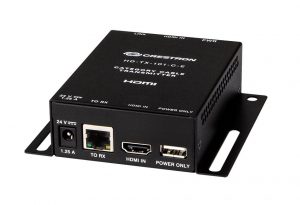
- CCS-UC-ZOOM EXPANDED KIT – Zoom Rooms Expanded Package – Provides all the capabilities of the CCS-UC-ZOOM BASIC KIT with the addition of an HDMI presentation content input and display signal extender. Includes the CCS-UC-1 console, mini PC with Zoom software, Logitech camera, HDMI to USB converter, HDBaseT® signal extender, cables, and power supply.
- CCS-UC-ZOOM-NC EXPANDED KIT – Zoom Rooms Expanded Package, No Camera – Identical to the CCS-UC-ZOOM EXPANDED KIT without the camera. Allows use of any Zoom Rooms compliant USB camera.
For complete details, please refer to the individual spec sheet for each system kit. Visit https://www.crestron.com/flex for an overview of all available Crestron Flex UC systems. Visit https://www.crestron.com/zoomrooms for more information on Zoom Rooms solutions.
In all its forms, Crestron Mercury transforms any meeting room, huddle space, or executive office into a highly effective collaboration space, enabling people to work together and share content irrespective of location. Intuitive operation, exceptional full-duplex wideband audio, and full-motion HD video (as applicable) afford a gratifying and productive meeting experience for all participants. Crestron Mercury is secure, easy to deploy, and easy to manage, with extensive features and capabilities engineered to maximize the value of your investment through increased efficiency and productivity.
Voice Calling & Audio Conferencing (CCS-UC-1 & CCS-UC-1-AV Only)
- Crestron Mercury is a full-featured VoIP conferencing speakerphone that’s fully compatible with major SIP-compliant phone systems. Its advanced design provides highly intelligible, full-duplex communication for every participant around a conference table. Dialing and answering calls is easy and intuitive using the large HD color touch screen. Corporate directory access (LDAP) enables one-touch dialing from the customer’s centrally managed directory.
- Crestron Mercury pairs with any mobile phone using Bluetooth to make calls or join a call in progress. It instantly transforms a personal phone call into a whole-room audio conference with clear, echo-free audio and the ability to start and stop a call, adjust volume, mute, and display caller ID on the touch screen. Bluetooth enabled phones appear automatically on the touch screen, enabling instant connectivity with the press of a button.
- Connecting a laptop computer via USB enables enhanced audio performance for any softphone or audio conferencing application running on the laptop.
- Native Skype for Business VoIP support enables one-touch join capability to join a scheduled Skype meeting (audio only), or you can simply place a Skype call using the directory or dial pad.
Additionally, Crestron Mercury behaves like any Bluetooth or USB Audio class device, enabling use as a speaker and/or microphone for all types of multimedia applications running on a computer or smartphone. Even if you’re not on a call, you can use Crestron Mercury to share audio content with everyone in the room, or make a professional audio recording of the meeting, with exceptional results.
BYOD Multimedia Presentation (CCS-UC-1-AV Only)
- Connecting a display device to the CCS-UC-1-AV’s HDMI output enables high-definition video presentation from all types of BYOD sources.
- Built-in AirMedia 2.0 technology allows for wireless presentation of content from a laptop, smartphone, or tablet device via the room’s Wi-Fi® wireless network. For more information about AirMedia, please visit https://www.crestron.com/airmedia.[1]
- Any AV source can be plugged in via HDMI to present full-motion HD video content on the room display. Sources with DisplayPort or USB Type-C™ outputs can also be connected using the optional Multihead HD Video Cable (sold separately).[2]
Video Conferencing & Web Collaboration (CCS-UC-1-AV Only)
- Videoconferencing is enabled on the CCS-UC-1-AV by simply connecting a laptop running a web conferencing or UC application such as Microsoft Teams, Skype for Business, Cisco WebEx®, GotoMeeting®, Slack®, BlueJeans, or Zoom. No more huddling around a laptop to interact and share content with remote participants.
- With the laptop and a camera connected to the CCS-UC-1-AV via USB, Crestron Mercury provides all participants with enhanced bidirectional audio and a high-definition view of the room.
- Connecting the laptop’s HDMI output allows the whole room to view far-end content and camera images on the main room display. Laptops with DisplayPort or USB Type-C outputs can also be connected using the optional Multihead HD Video Cable (sold separately).
Microsoft Teams® Intelligent Communications (CCS-UC-1-T & CCS-UC-1-T-V Only)
Microsoft Teams is the hub for teamwork in Office 365 software, engaging people and bringing them together through messaging, voice over IP, online meetings, conferencing, content sharing, and collaboration.
- The CCS-UC-1-T provides a native Microsoft Teams IC audio conferencing experience for any meeting space in an enterprise or SMB facility implementing a cloud based Microsoft Teams deployment.
- As part of a complete Crestron Flex system, the CCS-UC-1-T-V provides a native Microsoft Teams IC video conferencing experience, whether implementing a cloud based Microsoft Teams deployment, on-premises Skype for Business, or a hybrid of the two.
- Through one amazing tabletop device, Crestron Mercury facilitates effortless audio or video conferencing and control, with simple operation and one-touch meeting joins through a feature-rich touch screen UX familiar to users of Microsoft Teams and Office 365 software. Onboard calendaring and corporate directory access provide knowledge workers with the tools they need to work smart and efficiently.
Zoom Rooms™ Video Conferencing & Collaboration (CCS-UC-1 Only)
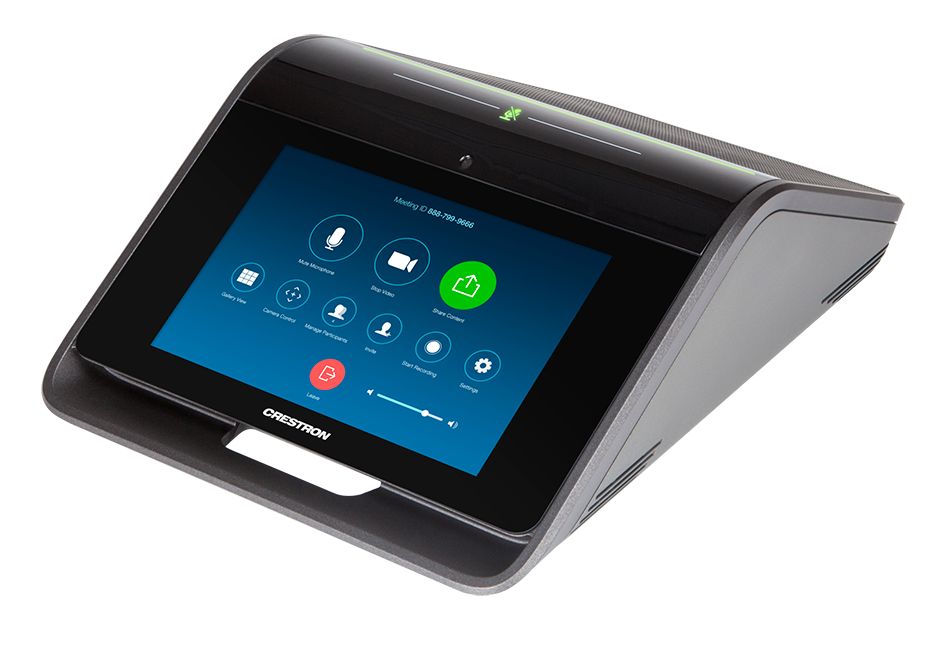
- Native Zoom Rooms mode enables the CCS-UC-1 to be used as a high-performance conferencing speakerphone and touch screen control panel for a Zoom Rooms software-based conferencing and collaboration solution. It replaces the individual speaker, microphone, and tablet components of a typical Zoom Rooms setup, delivering the user-friendly Zoom Rooms experience in one integrated tabletop device with enhanced audio performance, increased reliability, and easy setup. For information, please visit https://www.crestron.com/zoomrooms.
Superb Sound Quality
Crestron Mercury’s advanced design facilitates perfectly natural conversations with exceptional audio fidelity and pickup. Its integrated 360° quad microphone array faithfully captures voices at every seat at the table. Its high-powered, full-range speaker produces full, rich and real sounding audio for both voice and program material.[2] Limes Audio TrueVoice® AEC technology achieves transparent full-duplex performance free of distracting echo or noise. Wideband audio codec support allows for full-spectrum, bidirectional voice communication.
Functional Flexibility
Crestron Mercury’s unique sloped shape is not only attractive and unobtrusive — it’s also functional, allowing for placement at either the center or head of the table. Large or long tables are easily accommodated by adding up to two mic pods ( CCS-UCA-MIC KIT sold separately), which may be daisy-chained or individually home run to the main console.[3]
Tapping the mute bar on top of the console mutes the microphones. Its extra-bright, bi-color indicator bar ensures that the mic and mute status are clearly visible to the whole room. Each mic pod also includes a remote mute button and indicator for full room participation.
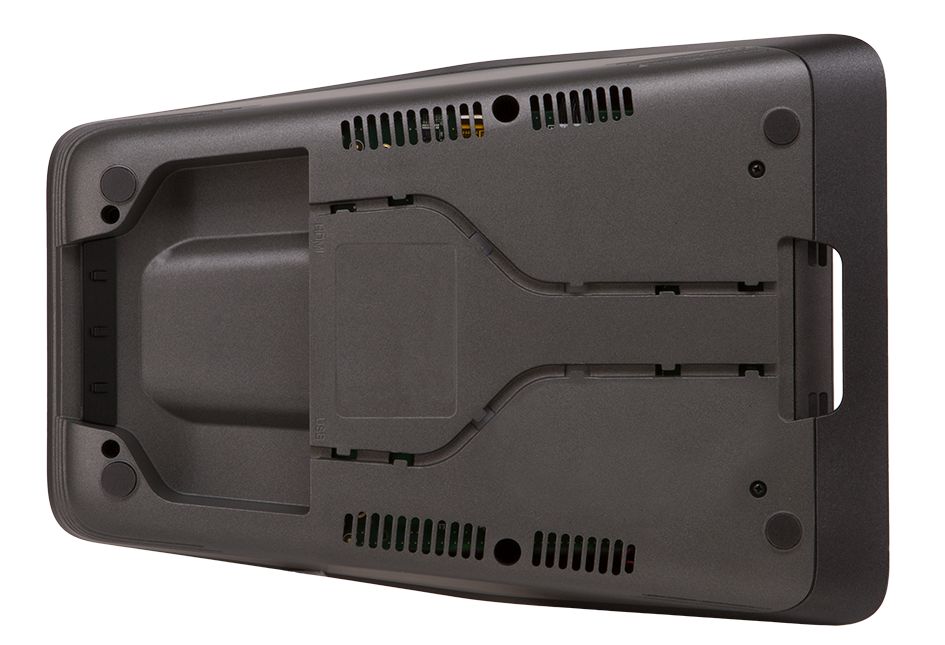
For ultimate versatility, the console can be powered using either PoE+ or a 100-240V universal power pack.[3] It can sit freely on any tabletop surface, or be permanently attached to the table using the optional 180° swivel mount kit ( CCS-UCA-SMK sold separately).
One great benefit of the Crestron Mercury platform is that any model can be updated with new firmware and licensing to change its functionality, so there’s no need to purchase a different model when it’s time to convert to a new UC platform or room configuration. Each model is sold exclusively as part of a system kit, which comes with all required components and cables to mate with your choice of display devices (where applicable) for a quick, complete installation.
HD Color Touch Screen
Its extra-large, high-definition touch screen makes Crestron Mercury easy for everyone to use, whether starting or joining an online meeting, dialing or answering a phone call or video call, looking up contacts, presenting content, or managing the room schedule. The full-color user interface provides quick access and intuitive operation, and affords a consistent user experience from room to room. The touch screen is configurable to provide just the functions required, and can be personalized using custom background images.
The CCS-UC-1-T and CCS-UC-1-T-V models feature a customizable, feature-rich UI familiar to users of Microsoft Teams and Office 365 software, so staff members can move effortlessly between using Crestron Mercury in a meeting room and a personal computer or phone at their desk or workstation.
Additionally, as part of a Crestron Flex system, the CCS-UC-1-T-V includes the ability to integrate with a Crestron control system to enable touch screen control over room lighting, motorized window shades, climate control, AV, and other amenities.[4]
When operated in Zoom Rooms mode, the CCS-UC-1 displays a UI consistent with the standard Zoom Rooms application.
Room Scheduling Integration (CCS-UC-1 & CCS-UC-1-AV Only)
The CCS-UC-1 and CCS-UC-1-AV models integrate directly with Microsoft® Exchange or Crestron Fusion® to allow seamless room scheduling and automation for any number of rooms. The built-in calendar application provides details about the current scheduled meeting, and allows meetings to be scheduled or extended right from the touch screen.
For video applications using the CCS-UC-1-AV, meeting attendees are welcomed to the room with a confirmation of the scheduled meeting on the front-of-room display. As the meeting progresses, gentle notifications appear on screen to show the time left and what’s scheduled next for the room. The onscreen UX is customizable to display just the information required, and can be personalized using custom background images and corporate logos.
As part of a Crestron Fusion room scheduling solution, the Crestron PinPoint™ App can be used to locate and reserve any available room in the facility. As you enter a room equipped with a Crestron Mercury console, the built-in PinPoint beacon [5] detects your presence and provides personalized feedback and connection options on your mobile device, letting you instantly start your presentation. Crestron Mercury also works with Crestron room scheduling touch screens installed outside each room, all integrated through Crestron Fusion or Microsoft Exchange.
Note: When operated in Zoom Rooms mode, the CCS-UC-1 allows for room scheduling and meeting management consistent with the standard Zoom Rooms application.
Occupancy Sensing
Crestron Mercury detects room occupancy using a patent-pending combination of motion and voice activity. A built-in passive infrared detector initially senses when someone is present in front of the touch screen, and then voice activity is used to maintain the room’s occupied status as long as anyone in the room is talking.
Occupancy detection provides several benefits, such as monitoring and reporting room usage to Crestron Fusion, or automating the system to power down to save energy when all parties leave the room. System power can also be managed according to a daily schedule.
Network Management and Security
Crestron Mercury is an enterprise-grade appliance, ideally equipped for mass deployment throughout any-sized corporate, university, medical, military, or governmental facility. The CCS-UC-1-T and CCS-UC-1-T-V models are engineered in partnership with Microsoft to integrate seamlessly into a Microsoft Teams or Skype for Business deployment.
IoT cloud based provisioning enables complete network configuration in advance of hardware delivery, with touchless updates following installation. CCS-UC-1 and CCS-UC-1-AV devices can also be configured individually using a computer web browser, or in batches using the Crestron Deployment Tool for Powershell®.
Crestron Fusion or XiO Cloud management enables monitoring and logging of room and equipment usage, as well as centralized help desk support. Advanced security features ensure privacy, reliability, and compliance with the organization’s IT policies. The CCS-UC-1 and CCS-UC-1-AV models feature dual LAN ports to allow VoIP or AirMedia traffic to be isolated on a secondary network. PoE+ compatibility enables any Crestron Mercury console to be powered through its LAN connection.[3]
XiO Cloud™ Connected
XiO Cloud is Crestron’s unifying IoT cloud based platform for remotely provisioning, monitoring, and managing Crestron devices across an enterprise or an entire client base. XiO Cloud enables installers and IT managers to deploy and manage thousands of devices in the amount of time it would ordinarily take to manage just one. It provides a zero-touch solution that allows complete configuration of device settings without any hardware in hand, then simply connect each device on site and let XiO Cloud push out the settings, licenses, drivers, and firmware updates – automatically and securely – for a quick and painless, ready-to-use deployment.
Ongoing XiO Cloud services facilitate daily management and monitoring of every device through a single dashboard with comprehensive reporting and logging, live status viewing and alerts, performance metrics and analytics, scheduled actions and updates, and more. As requirements grow and evolve, new features and functionality can be added easily to one or many devices at any time without ever going on site. XiO Cloud is a subscription-based service offering an adaptable SaaS (Software as a Service) solution with graduated levels of functionality and unlimited scalability. For more information about XiO Cloud, please visit https://www.crestron.com/xiocloud.
Key Features
- The ultimate tabletop conferencing solution for any UC platform
- Multiple models available with application-specific functionality
- “Open UC” models for open-platform audio and video conferencing applications (CCS-UC-1 & CCS-UC-1-AV)
- Dedicated models for Microsoft Teams® audio and video conferencing applications (CCS-UC-1-T & CCS-UC-1-T-V)
- Each model sold exclusively as part of a complete Crestron Mercury®, Crestron Flex, or Zoom Rooms™ system kit
- Present, call, conference, and collaborate — all through one amazing tabletop device!
- Simple, intuitive touch screen UX — provides a consistent user experience in every room
- Native Microsoft Teams touch screen UX with one-touch meeting joins (CCS-UC-1-T & CCS-UC-1-T-V only)
- Customizable front-of-room experience on the room display (CCS-UC-1-AV only)
- Easy to provision and manage through Crestron® XiO Cloud™
- Connects and communicates securely over any enterprise or SMB network
- Full open SIP conferencing speakerphone (CCS-UC-1 & CCS-UC-1-AV only)
- Bluetooth® pairing with mobile phones (CCS-UC-1 & CCS-UC-1-AV only)
- USB connectivity for laptops running web conferencing or other software (CCS-UC-1 & CCS-UC-1-AV only)
- Native Skype® for Business VoIP support (CCS-UC-1 & CCS-UC-1-AV only)
- Native Zoom Rooms mode (CCS-UC-1 only)
- High-definition USB room camera input (CCS-UC-1-AV only)
- AirMedia® 2.0 wireless BYOD presentation and content sharing (CCS-UC-1-AV only) [1]
- HDMI® input for laptop and other AV content sources (CCS-UC-1-AV only) [2]
- DisplayPort and USB-C™ input via optional Multihead cable (sold separately for CCS-UC-1-AV only)
- HDMI output for room display device (CCS-UC-1-AV only)
- Exceptional full-duplex audio performance
- Extremely natural 2-way wideband voice quality
- Integrated 360° quad microphone array
- High-powered full-range speaker
- Limes Audio TrueVoice® AEC technology
- High-visibility mic mute indication
- Available add-on mic pods for extra coverage
- 7” (178 mm) HD color touch screen
- Optional control of room lighting, shades, thermostats, and other equipment (CCS-UC-1-T-V Only) [2]
- LDAP corporate directory access (CCS-UC-1 & CCS-UC-1-AV only)
- Active Directory® authentication and corporate directory access
- Microsoft® Exchange and Office 365® integration (CCS-UC-1-T & CCS-UC-1-T-V only)
- Onscreen calendaring and meeting management
- Room scheduling integration with Microsoft Exchange or Crestron Fusion® (CCS-UC-1 & CCS-UC-1-AV only)
- Built-in PinPoint™ beacon for use with the Crestron PinPoint App (CCS-UC-1 & CCS-UC-1-AV only) [5]
- Built-in PIR occupancy detector wakes the device and reports to Crestron Fusion
- Persistent occupancy awareness combining motion and voice detection
- IoT cloud based provisioning and management
- Web browser configuration
- Enterprise-grade security
- Dual LAN ports (CCS-UC-1 & CCS-UC-1-AV only)
- PoE+ or AC line powered [3]
- CEC, IP, IR, or RS-232 display control (CCS-UC-1-AV only)
- Power management and scheduling
- Optional 180° swivel mount kit available
| Communications | |
| Ethernet | CCS-UC-1 & CCS-UC-1-AV: Dual-port 10/100 Mbps, auto-switching, auto-negotiating, auto-discovery, full/half duplex, DHCP, TCP/IP, UDP/IP, CIP, SSL, TLS, SSH, SFTP (SSH File Transfer Protocol), SRTP, IEEE 802.1X, Active Directory authentication, LDAP, Kerberos, digest access authentication, password login, HTTPS secure provisioning, XiO Cloud client, primary port is IEEE 802.3at Type 2 PoE+ compliant; CCS-UC-1-T & CCS-UC-1-T-V: 10/100 Mbps, auto-switching, auto-negotiating, auto-discovery, full/half duplex, DHCP, TCP/IP, UDP/IP, CIP, SSL, TLS, SSH, SFTP (SSH File Transfer Protocol), SRTP, IEEE 802.1X, Active Directory authentication, digest access authentication, password login, XiO Cloud client, Microsoft Intune® client, IEEE 802.3at Type 2 PoE+ compliant |
| SIP VoIP | CCS-UC-1 & CCS-UC-1-AV Only: Open SIP, SDP, IETF SIP (RFC 3261 & companion RFCs), DTMF tone generation (RFC 2833 & in-band), low-delay audio packet transmission, adaptive jitter buffers, packet loss concealment |
| Skype for Business VoIP | CCS-UC-1 & CCS-UC1-AV Only: Skype for Business client (audio only), compatible with Office 365 cloud service or on-premises Skype for Business Server 2015 (or above); supports Enterprise Voice, Phone System, O365 modern authentication (limited), directory lookup, PSTN calling |
| Microsoft Teams VoIP | CCS-UC-1-T Only: Microsoft Teams client; compatible with Office 365 cloud service; supports Enterprise Voice, Phone System, O365 modern authentication (limited), directory lookup, PSTN calling; DTMF tone generation (RFC 2833 & in-band), low-delay audio packet transmission, adaptive jitter buffers, packet loss concealment, comfort noise generator |
| Microsoft Teams VC | CCS-UC-1-T-V Only: Integrates with the Crestron UC Engine via Ethernet to enable touch screen control of the system; refer to the UC-M150-T spec sheet for further details |
| Zoom | CCS-UC-1 Only: Supports Zoom Rooms mode for control of a PC running Zoom Rooms conferencing software (overrides the features and functions of “Open UC” mode) |
| Bluetooth | CCS-UC-1 & CCS-UC-1-AV Only: Bluetooth 4.0 device pairing for wideband speech (HFP) and multimedia audio streaming (A2DP), Crestron PinPoint proximity detection beacon[5] |
| USB Device | CCS-UC-1 & CCS-UC-1-T-V: USB 2.0 device supporting UAC and HID for plug & play compatible audio/speakerphone interface to a USB Audio Class host, AEC-enabled USB speakerphone compliant with Microsoft Teams & Skype for Business specifications; CCS-UC-1-AV: USB 2.0 device supporting UAC, UVC, and HID for plug & play compatible audio/speakerphone interface and camera video output to a USB host computer running web conferencing or other software; AEC-enabled USB speakerphone and camera compliant with Microsoft Teams & Skype for Business specifications |
| USB Host | CCS-UC-1-AV Only: USB 2.0 host supporting UVC for camera video input |
| RS-232 | CCS-UC-1-AV Only: 2-way display device control and monitoring up to 115.2k baud with software handshaking |
| IR/Serial | CCS-UC-1-AV Only: 1-way display device control via infrared up to 1.1 MHz or serial TTL/RS-232 (0-5 Volts) up to 19.2k baud |
| HDMI | CCS-UC-1-AV Only: HDCP 1.4, EDID, CEC |
| AirMedia | CCS-UC-1-AV Only: (Via Ethernet) IPv4, mDNS, TLS, AES[1] |
| Extension Microphones | A2B bus protocol, single master, multiple slave; synchronous data, multichannel I2S/TDM to I2S/TDM; exclusively for use with Crestron mic pods, model CCS-UCA-MIC-KIT (sold separately) |
| Audio | |
| Codec Support | CCS-UC-1 & CCS-UC-1-AV: G.711, G.722, G.729, Siren 7; CCS-UC-1-T: G.711, G.722, G.729, Siren 7, SILK |
| AEC | Limes Audio TrueVoice acoustic echo cancellation, automatic mic mixing, automatic gain control, and dynamic noise reduction; full-duplex IEEE 1329 Type 1 compliant |
| Microphones | 360° quad mic array with (4) cardioid electret elements; Pickup Range: 20 ft (6 m) typical |
| Speaker | Full range speaker; Amplifier Power: 11 Watts maximum; Output Volume: 95 dB SPL at 0.5 m; Frequency Response: 90 Hz to 22 kHz |
| Video (CCS-UC-1-AV Only) | |
| Content Input Signal Types | HDMI (DVI & Dual-Mode DisplayPort compatible[6]), AirMedia[1] |
| Camera Input/Output Signal Type | USB |
| Display Output Signal Types | HDMI (DVI compatible[6]) |
| Content Input Resolutions | Up to 1920×1080@60Hz (1080p60) |
| Display Output Resolutions | 1280×720@50Hz (720p50), 1280×720@60Hz (720p60), 1920×1080@50Hz (1080p50), 1920×1080@60Hz (1080p60) |
| AirMedia (CCS-UC-1-AV Only)[1] | |
| Mobile App OS Support | Apple® iOS®, Android® |
| Client Software OS Support | Windows® 7, Windows 8, Window 10, macOS® (versions 10.10 through 10.13) |
| Client Software Video Frame Rate | 30 fps, audio supported |
| Full Screen Device Mirroring | Shares the screen image and audio from an Apple iOS, Android, macOS, or Windows device |
| Resolutions | 800×600@60Hz, 1024×768@60Hz, 1280×720@60Hz (720p60), 1280×768@60Hz, 1280×800@60Hz, 1280×1024@60Hz, 1360×768@60Hz, 1400×1050@60Hz, 1440×900@60Hz, 1600×1200@60Hz, 1920×1080@60Hz (1080p60), 1920×1200@60Hz |
| Bitrate Peak | 0.25 to 8.5 Mbps, variable depending on content complexity |
| Bitrate Average | 1.4 Mbps typical; Note: The bitrate for Apple native mirroring may deviate from above depending on the OS version and content |
| Audio Format | Stereo |
| Occupancy Sensor | |
| PIR Detection Range | 6 ft (1.83 m) in front of touch screen, wakes touch screen and reports room occupancy to Crestron Fusion (CCS-UC-1-AV also wakes display device) |
| Voice Activity Detection | Keeps room occupancy, touch screen, and display active as long as speech is detected through the microphones |
| Touch Screen | |
| Display Type | TFT active matrix color LCD |
| Size | 7 inch (178 mm) diagonal |
| Aspect Ratio | 16:10 WXGA |
| Resolution | 1280 x 800 pixel |
| Touch Screen | Capacitive, multi-touch capable |
| Character Support | Unicode UTF-8 |
| Language Support | CCS-UC-1 & CCS-UC-1-AV: Arabic, Chinese (Simplified), Chinese (Traditional), Czech, Danish, Dutch (NL), English (UK), English (US), Finnish, French (FR), German (DE), Greek, Hebrew, Hungarian, Italian (IT), Japanese (JP), Korean, Norwegian (NO), Polish, Portuguese, Portuguese (Brazilian), Romanian, Russian (RU), Slovak, Spanish (ES), Swedish, Thai; CCS-UC-1-T & CCS-UC-1-T-V: To be determined |
| Buttons & Indicators | |
| Mic Mute Symbol & Light Bar | (2) Capacitive “buttons” with bi-color LEDs, either button toggles between mute and unmute, the symbol LED blinks green when the unit is powering up, all LEDs illuminate red when the mic is muted, all LEDs illuminate green when the mic is unmuted during an active call or online meeting |
| Connectors | |
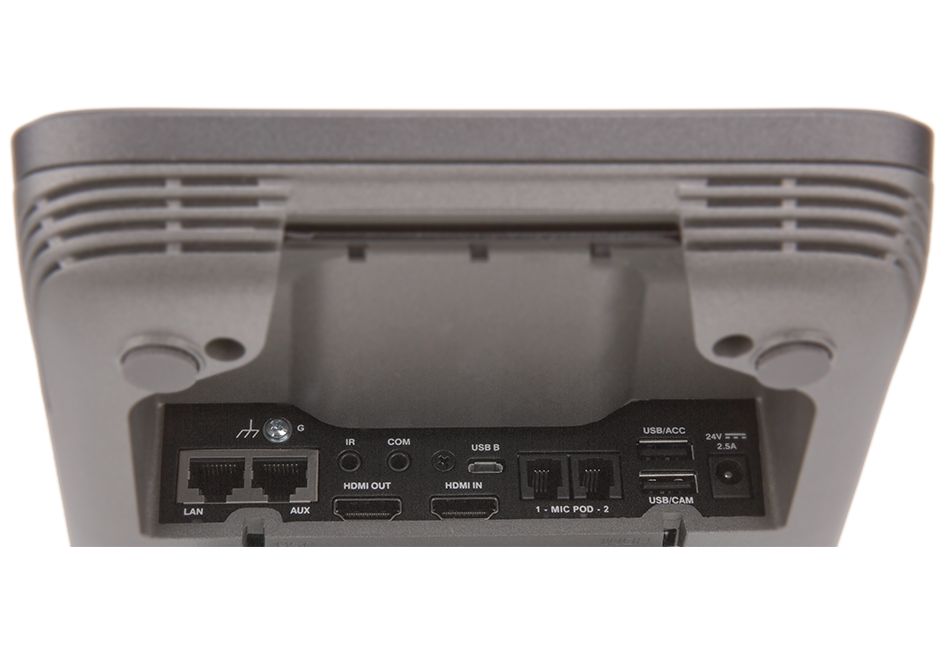
| G | (1) 6-32 screw; Chassis ground lug |
| LAN | (1) 8-pin RJ45 connector, female; 10Base-T/100Base-TX Ethernet port; PoE+ PD port[3]; 12 ft (3.66 m) Ethernet cable included |
| AUX | (1) 8-pin RJ45 connector, female; 10Base-T/100Base-TX Ethernet port; Alternate LAN connection for separate SIP or AirMedia network; Enabled on models CCS-UC-1 and CCS-UC-1-AV only |
| IR | (1) 3.5 mm mini-phone jack; IR output port for display device control; Enabled on model CCS-UC-1-AV only |
| COM | (1) 3.5 mm TRS mini phone jack; Bidirectional RS-232 port for display device control; Enabled on model CCS-UC-1-AV only |
| USB B | (1) Micro-USB Type B connector, female; USB 2.0 device port; 6 ft (1.83 m) USB micro-B male to A male cable included |
| HDMI OUT | (1) HDMI Type A connector, female; Digital video/audio output for display device; Enabled on model CCS-UC-1-AV only |
| HDMI IN | (1) HDMI Type A connector, female; Digital video/audio input for presentation content source; DisplayPort and USB Type-C compatible using CBL-MULTI-HD-6 Multihead cable (sold separately); Enabled on model CCS-UC-1-AV only |
| MIC POD 1 – 2 | (2) RJ9 4P4C connectors, female; For connection of up to two CCS-UCA-MIC microphone pods (sold separately)[3] |
| USB/ACC | (1) USB Type A connector, female; USB 2.0 host port; Powers optional CBL-MULTI-HD-6 Multihead cable; For use with model CCS-UC-1-AV only |
| USB/CAM | (1) USB Type A connector, female; USB 2.0 host port for camera; For use with model CCS-UC-1-AV only |
| 24V DC 2.5A | (1) 2.1 x 5.5 mm DC power connector; 24 Volt DC power input for universal power pack[3] |
| Power | |
| Power over Ethernet | IEEE 802.3at Type 2, Class 4 (25.5 W) PoE+ Powered Device[3] |
| Power Pack | Input: 100-240 Volts AC, 50/60 Hz; Output: 2.5 Amps @ 24 Volts DC; Model: PW-2420RU[3] |
| Power Consumption | 20 Watts (typical) |
| Environmental | |
| Operational Temperature | 32° to 95° F (0° to 35° C) |
| Storage Temperature | -4° to 160° F (-20° to 70° C) |
| Humidity | 5% to 95% RH (non-condensing) |
| Heat Dissipation | 123 BTU/hr (typical) |
| Dimensions | |
| Height | 4.11 in (105 mm) |
| Width | 8.92 in (227 mm) |
| Depth | 12.74 in (324 mm) |
| Weight | |
| 5.5 lb (2.5 kg) | |