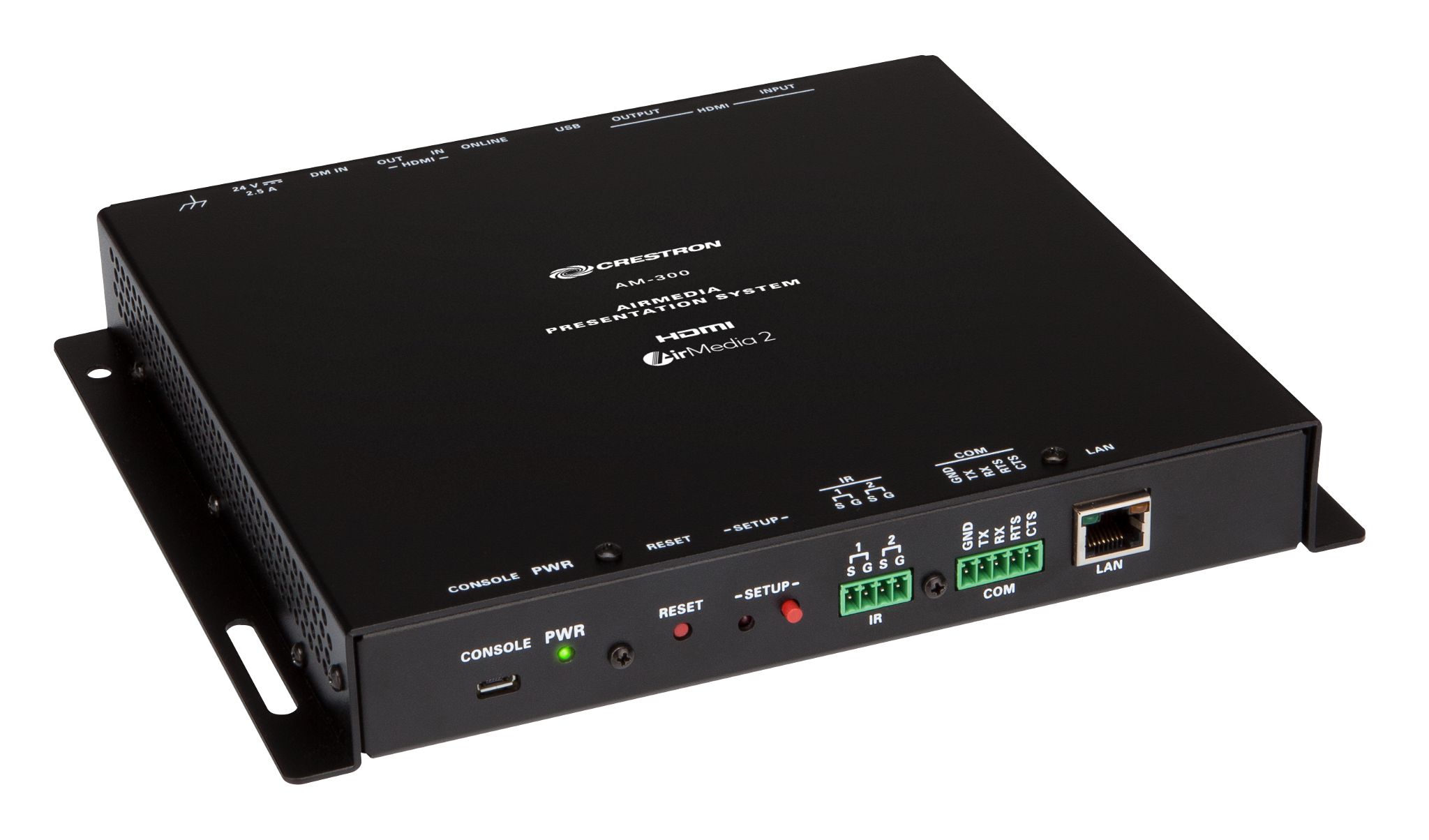
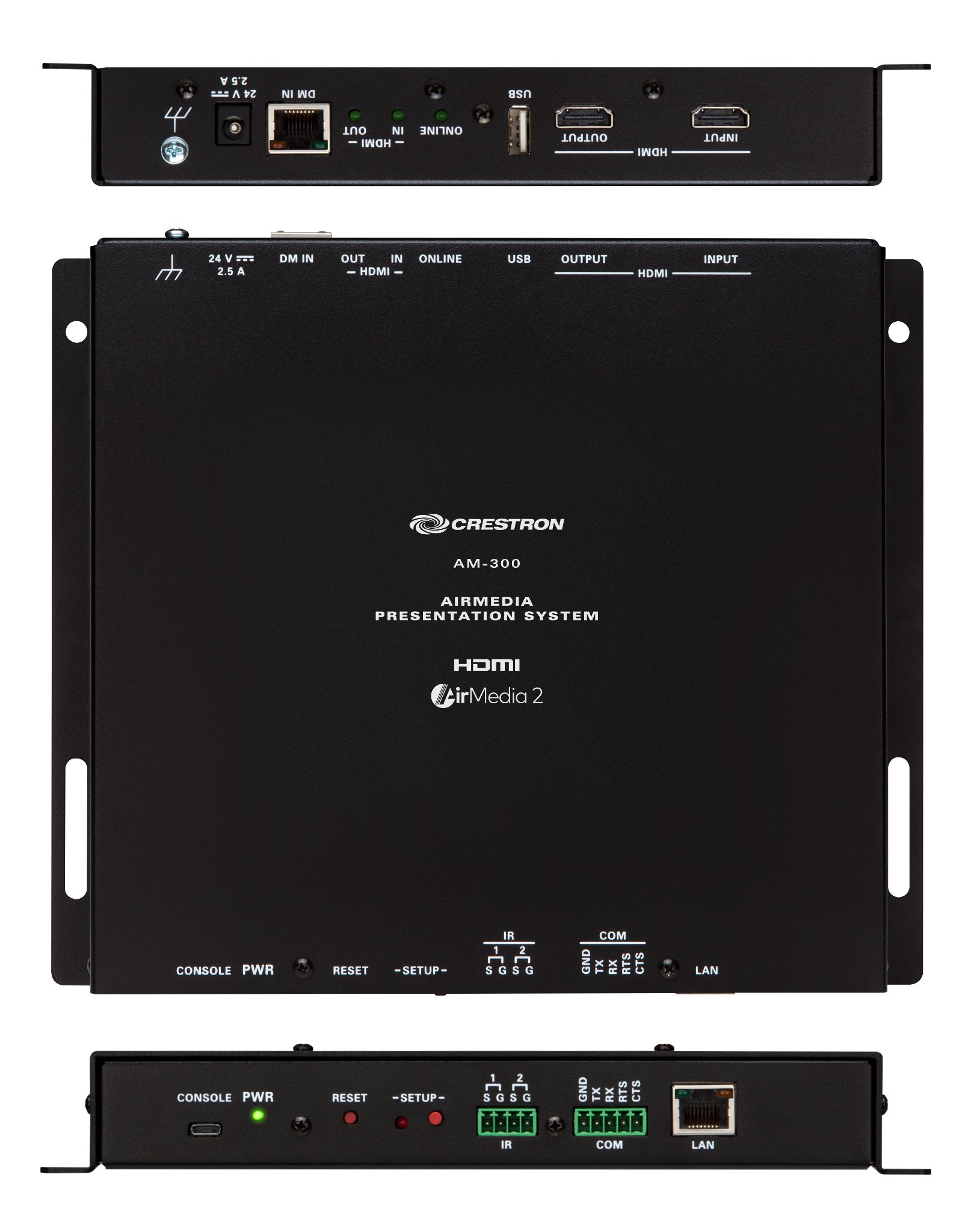
The Media Presentation System 300 (AM-300) provides secure wired and wireless presentation in lounges, lobbies, and open spaces, and integrates with popular calendaring platforms to maximize use. It is ideal for organizations with a dispersed workforce, open floor plans, and reliance on mobile devices to present.
Connect and Present
The AM-300 mounts invisibly behind a wall-mount display and enables wired or wireless presentation with autoswitching. It features AirMedia 2.0 wireless presentation capability, an HDMI® input, a DM input, HDMI output to the display (HD or WUXGA), and auto-on/off display control via CEC, serial, or IR. Connecting a source selects that input automatically and instantly displays the source image on the display. There’s no programming required, no dongles to plug in, and no remotes to lose or batteries to replace.
AirMedia Wireless Presentation
Crestron AirMedia technology allows for wireless presentation of content from a personal computer, laptop, or mobile device via a Wi-Fi® wireless network. Airmedia enables presentation of Full HD video at frame rates up to 30 fps. Desktop and laptop computer users can present content using downloadable client software, the AirMedia extension for Google Chrome™ browser, or Miracast™1 screen mirroring technology (Windows 10 computers only). Android and iOS mobile devices can present with the AirMedia app or the Crestron PinPoint™ app. For more information about AirMedia, visit www.crestron.com/airmedia.2
HDMI and DM Connectivity
In addition to AirMedia, the AM-300 includes an HDMI input for direct connection of a mini-PC or other local source, or a portable laptop computer via an optional wall plate or cable. A DM® input (DM 8G+®) is also provided, allowing a DM 8G+ transmitter to be installed at a convenient location in the space to facilitate a wired connection of a laptop or other source. The DM input may also be used to connect to a DM switcher, which may be located up to 330 ft (100 m) away, to support the display of content from another room or other remote location. The HDMI input supports HD 1080p signals while the DM input supports 4K signals.3,4,5
Native Appspace Functionality
The AM-300 integrates with the Appspace content management application for digital signage which allows the AM-300 to show Appspace content on a connected display when a space is not in use.
Works with Crestron Airboard™ Whiteboard Capture System
The AM-300 works with the Crestron Airboard™ Whiteboard Capture System (CCS-WB-1). Simply pair the CCS-WB-1 with the AM-300, and all of the CCS-WB-1 controls are available on the associated touch screen.6 Manage remote participants, start and stop a whiteboard session, route the whiteboard content to the associated display, and email a snapshot or timeline of the whiteboard session.7
Enhanced Onscreen Experience
When no presentation source is connected, the AM-300 displays a customizable welcome screen on the room display with simple instructions for connecting and presenting. Integration with Microsoft Exchange (for users of Outlook® and Office 365®) or Crestron Fusion® room scheduling allows the space’s availability and details about the current scheduled meeting to appear on-screen. As the meeting progresses, notifications appear periodically to indicate how much time is left in the meeting and what’s scheduled next for the space. Pop-up messages, sent from Crestron Fusion, may also appear in the event of an emergency or other important announcement.
Crestron XiO Cloud Provisioning and Management
The AM-300 is compatible with the Crestron XiO Cloud™ service, which is an IoT (Internet of Things) based platform for remotely provisioning, monitoring, and managing Crestron devices across an enterprise or an entire client base. The service enables installers and IT managers to deploy and manage thousands of devices in the amount of time it previously took to manage just one. As part of the AM-300 system, the Crestron XiO Cloud service allows for network management and provisioning, remote firmware updates and system alerts. For more information, visit www.crestron.com/xiocloud.
Crestron Fusion Room Monitoring
AM-300 presentation spaces can be managed and centrally monitored through the Crestron Fusion enterprise management service. By adding an optional wireless occupancy sensor, the AM-300 can report and log when people are present in the space, turning the display on and off accordingly, and returning unused spaces to inventory to maximize availability for new bookings. Crestron Fusion software supports room scheduling, and can integrate with a variety of third-party calendaring applications. In the event of a technical issue, instant alerts notify the help desk to rapidly resolve problems and maximize uptime and workflow. For more information about Crestron Fusion, visit www.crestron.com/fusion.
Enterprise-Grade Security
The AirMedia Presentation System is an enterprise-grade solution that can be deployed across hundreds of spaces, and set up easily using just a web browser, Crestron Fusion, or Crestron XiO Cloud service. It employs standard network security protocols, including 802.1x network access control, Active Directory® authentication, and AES content encryption, to protect privacy and ensure compliance with your organization’s IT policies.
Add-on Control Options
Manual control of the AM-300 can be enabled by adding a Crestron TSW‑760 or TSW‑1060 series touch screen. The touch screen provides a small-screen view of the room schedule and meeting details, with controls for input source selection, display power on/off, and display volume and mute, plus a help page. Additional control options include a wireless 4‑button keypad (ZUMMESH‑KP10AMBATT series8), which provides simple on/off and volume control, and a wireless occupancy sensor (ZUMMESH‑PIR‑OCCUPANCY‑BATT) for enhanced automation and room monitoring functionality. The wireless keypad and occupancy sensor require the addition of the wireless AV Bridge accessory (ZUMMESH‑AVBRIDGE), which connects to the AM-300 via USB.
Key Features
- Complete room solution provides wired and wireless presentation with AirMedia® 2.0 wireless presentation from laptops, smartphones, and tablet devices, while delivering enterprise-grade security and content encryption to protect privacy and ensure compliance with IT policies
- Use with optional Crestron Airboard™ Whiteboard Capture System to display and share whiteboard content
- Integration with Appspace® digital signage software platform for content display when system is not in use
- HDMI® and DM® inputs provide wired connectivity for sources
- Customizable welcome screen provides clear instructions for presenters, displaying space availability, meeting details, and other messages on-screen
- Natively integrates with Microsoft® Office 365®, Outlook®, and other calendaring applications as well as Crestron Fusion® room scheduling and enterprise management services
- Crestron XiO Cloud™ service support enables remote provisioning and management
| Communications | |||||||||||||||||||||||||||||||||||||||||
| Ethernet | 10/100 Mbps, auto-switching, auto‑negotiating, auto‑discovery, full/half duplex, TCP/IP, UDP/IP, DHCP, SSL, TLS, SSH, SFTP (SSH File Transfer Protocol), IEEE 802.1x, Active Directory authentication, HTTPS web browser setup and Crestron XiO Cloud client | ||||||||||||||||||||||||||||||||||||||||
| AirMedia | (Via Ethernet) IPv4, mDNS, TLS, AES 2 | ||||||||||||||||||||||||||||||||||||||||
| USB Host | USB 2.0 for optional Crestron AV Bridge (model ZUMMESH-AVBRIDGE sold separately) to enable wireless keypad control and occupancy sensing 8 | ||||||||||||||||||||||||||||||||||||||||
| USB Device | USB 2.0 for computer console (installer setup and firmware update) | ||||||||||||||||||||||||||||||||||||||||
| RS-232 | 2-way display device control up to 115.2k baud with hardware and software handshaking | ||||||||||||||||||||||||||||||||||||||||
| IR/Serial | 1-way display device control via infrared up to 1.1 MHz or serial TTL/RS-232 (0-5 V) up to 19.2k baud | ||||||||||||||||||||||||||||||||||||||||
| DigitalMedia™ | DM 8G+, HDCP 1.4 or 2.2, EDID, Ethernet, PoDM sourcing 4 | ||||||||||||||||||||||||||||||||||||||||
| HDMI Input | HDCP 1.4, EDID; Supports management of HDCP and EDID | ||||||||||||||||||||||||||||||||||||||||
| HDMI Output | HDCP 1.4 or 2.2, EDID, CEC; Supports management of HDCP and EDID | ||||||||||||||||||||||||||||||||||||||||
| AirMedia 2 | |||||||||||||||||||||||||||||||||||||||||
| OS Support | Apple® iOS®, Android™, Windows® 7, Windows 8, Windows 10, macOS®, Chrome OS™ | ||||||||||||||||||||||||||||||||||||||||
| Video Frame Rate | Up to 30 fps, audio supported | ||||||||||||||||||||||||||||||||||||||||
| Note: Audio is not supported on Android devices | |||||||||||||||||||||||||||||||||||||||||
| Output Resolutions | 640×480@60Hz, 800×600@60Hz, 1024×768@60Hz, 1280×720@50Hz (720p50), 1280×720@60Hz (720p60), 1280×800@60Hz, 1366×768@60Hz, 1440×900@60Hz, 1600×900@60Hz, 1600×1200@60Hz, 1680×1050@60Hz, 1920×1080@50Hz (1080p50), 1920×1080@60Hz (1080p60) | ||||||||||||||||||||||||||||||||||||||||
| Note: All video inputs will be scaled to the selected HDMI output resolution. | |||||||||||||||||||||||||||||||||||||||||
| Bitrate Peak | 0.25 to 8.5 Mbps, variable depending on content complexity | ||||||||||||||||||||||||||||||||||||||||
| Bitrate Average | 1.4 Mbps typical | ||||||||||||||||||||||||||||||||||||||||
Notes:
| |||||||||||||||||||||||||||||||||||||||||
| Audio Format | Stereo | ||||||||||||||||||||||||||||||||||||||||
| Video | |||||||||||||||||||||||||||||||||||||||||
| Input Signal Types | AirMedia, DM 8G+, HDMI (DVI & Dual-Mode DisplayPort™ compatible 3) | ||||||||||||||||||||||||||||||||||||||||
| Output Signal Types | HDMI (DVI compatible 3) | ||||||||||||||||||||||||||||||||||||||||
Maximum Input Resolutions
| |||||||||||||||||||||||||||||||||||||||||
| NOTE: Common input resolutions are shown; other custom input resolutions are supported at pixel clock rates up to 300 MHz for the DM 8G+ input, or 148 MHz for the HDMI input; interlaced video is not supported via the HDMI input. | |||||||||||||||||||||||||||||||||||||||||
| Output Resolutions | 1920×1080@60Hz (1080p60), 3840×2160@30Hz (4K UHD) | ||||||||||||||||||||||||||||||||||||||||
| NOTE: All video inputs will be scaled to the selected HDMI output resolution. | |||||||||||||||||||||||||||||||||||||||||
| Background & Logo File Support | GIF, JPEG, PNG | ||||||||||||||||||||||||||||||||||||||||
| Audio | |||||||||||||||||||||||||||||||||||||||||
| Input Signal Types | AirMedia, DM 8G+, HDMI (Dual-Mode DisplayPort compatible 3) | ||||||||||||||||||||||||||||||||||||||||
| Output Signal Types | HDMI | ||||||||||||||||||||||||||||||||||||||||
| DM Input Formats | Up to 8 channel LPCM | ||||||||||||||||||||||||||||||||||||||||
| HDMI Input Formats | 2 channel LPCM | ||||||||||||||||||||||||||||||||||||||||
| HDMI Output Formats | Up to 8 channel LPCM | ||||||||||||||||||||||||||||||||||||||||
| NOTE: Audio input signals are passed to the output without any processing, encoding, decoding, or downmixing. Volume control capability requires a display device with discrete volume up, down, and mute commands available via CEC, IP, IR, or RS-232. | |||||||||||||||||||||||||||||||||||||||||
| Connectors | |||||||||||||||||||||||||||||||||||||||||
| CONSOLE | (1) Micro-USB Type B connector, female; USB 2.0 device port for computer console (installer setup); 6 ft (1.83 m) USB Type A to Micro-B cable included | ||||||||||||||||||||||||||||||||||||||||
| IR | (1) 4-pin 3.5 mm detachable terminal block; IR/Serial output port for display device control; IR output up to 1.1 MHz; 1-way serial TTL/RS-232 (0-5 V) up to 19200 baud; Note: IR port #2 is not used. IRP2 emitter sold separately. | ||||||||||||||||||||||||||||||||||||||||
| COM | (1) 5-pin 3.5 mm detachable terminal block; Bidirectional RS-232 port for display device control; Up to 115.2k baud, hardware and software handshaking support | ||||||||||||||||||||||||||||||||||||||||
| LAN | (1) 8-pin RJ45 connector, female; 10Base-T/100Base-TX Ethernet port | ||||||||||||||||||||||||||||||||||||||||
| HDMI INPUT | (1) HDMI Type A connector, female; HDMI digital video/audio input; (DVI & Dual-Mode DisplayPort compatible 3) | ||||||||||||||||||||||||||||||||||||||||
| HDMI OUTPUT | (1) HDMI Type A connector, female; HDMI digital video/audio output; (DVI compatible 3) | ||||||||||||||||||||||||||||||||||||||||
| USB | (1) USB Type A connector, female; USB 2.0 host port for Crestron AV Bridge (ZUMMESH-AVBRIDGE sold separately) | ||||||||||||||||||||||||||||||||||||||||
| DM IN | (1) 8-pin RJ45 connector, female, shielded; DM 8G+ input and PoDM PSE port 3,4 | ||||||||||||||||||||||||||||||||||||||||
| 24 VDC 2.5 A | (1) 2.1 x 5.5 mm DC power connector; 24 VDC power input; PW-2420RU power pack included | ||||||||||||||||||||||||||||||||||||||||
| Ground | (1) 6-32 screw; Chassis ground lug | ||||||||||||||||||||||||||||||||||||||||
| Controls & Indicators | |||||||||||||||||||||||||||||||||||||||||
| PWR | (1) Green LED, indicates operating power supplied via the local power pack, flashes while booting | ||||||||||||||||||||||||||||||||||||||||
| RESET | (1) Recessed pushbutton for hardware reset | ||||||||||||||||||||||||||||||||||||||||
| SETUP | (1) Red LED and (1) recessed pushbutton for Ethernet setup, momentarily displays the device’s IP address at the HDMI output when pressed | ||||||||||||||||||||||||||||||||||||||||
| LAN | (2) LEDs, green LED indicates Ethernet link status, amber LED indicates Ethernet activity | ||||||||||||||||||||||||||||||||||||||||
| ONLINE | (1) Green LED (not used) | ||||||||||||||||||||||||||||||||||||||||
| HDMI IN & OUT | (2) Green LEDs, indicate HDMI signal presence at the HDMI input or output | ||||||||||||||||||||||||||||||||||||||||
| DM IN | (2) LEDs, green LED indicates DM link status, amber LED indicates video and HDCP signal presence | ||||||||||||||||||||||||||||||||||||||||
| Power | |||||||||||||||||||||||||||||||||||||||||
| Power Pack (included) | Input: 1.5 A maximum @ 100-240 VAC, 50/60 Hz; Output: 2.5 A @ 24 VDC; Model: PW-2420RU | ||||||||||||||||||||||||||||||||||||||||
| Power Consumption | 24 W (typical without a PoDM PD connected) | ||||||||||||||||||||||||||||||||||||||||
| Environmental | |||||||||||||||||||||||||||||||||||||||||
| Temperature | 32° to 104° F (0° to 40° C) | ||||||||||||||||||||||||||||||||||||||||
| Humidity | 10% to 90% RH (non-condensing) | ||||||||||||||||||||||||||||||||||||||||
| Heat Dissipation | 81.9 BTU/hr | ||||||||||||||||||||||||||||||||||||||||
| Enclosure | |||||||||||||||||||||||||||||||||||||||||
| Chassis | Metal, black finish, with (2) integral mounting flanges, fan cooled, vented sides | ||||||||||||||||||||||||||||||||||||||||
| Mounting | Freestanding, surface mount, or attach to a single rack rail | ||||||||||||||||||||||||||||||||||||||||
| Dimensions | |||||||||||||||||||||||||||||||||||||||||
| Height | 7.93 in (203 mm) | ||||||||||||||||||||||||||||||||||||||||
| Width | 9.28 in (236 mm) | ||||||||||||||||||||||||||||||||||||||||
| Depth | 1.36 in (35 mm) | ||||||||||||||||||||||||||||||||||||||||
| Weight | |||||||||||||||||||||||||||||||||||||||||
| 1 lb, 9.6 oz (726g) | |||||||||||||||||||||||||||||||||||||||||
| Compliance | |||||||||||||||||||||||||||||||||||||||||
| UL® Listed for US & Canada, CE, IC, FCC Part 15 Class B digital device | |||||||||||||||||||||||||||||||||||||||||
| DM 8G+ Maximum Cable Lengths | |||||||||||||||||||||||||||||||||||||||||
| |||||||||||||||||||||||||||||||||||||||||